
Put transactions in context.
Organize invoices, bills and transaction entries by account and company or legal entity.
Income & expenses / Receivables / Payables
FILWORX LEDGER / ACCOUNTING & FINANCIAL MANAGEMENT
For accountants, finance teams and business owners. Organize invoices, supplier bills, journals and financial reports. Review receivables, payables and period-close checks with FilWorx Ledger.
Read-only AI financial questions and receipt extraction with human confirmation, available in selected packages.
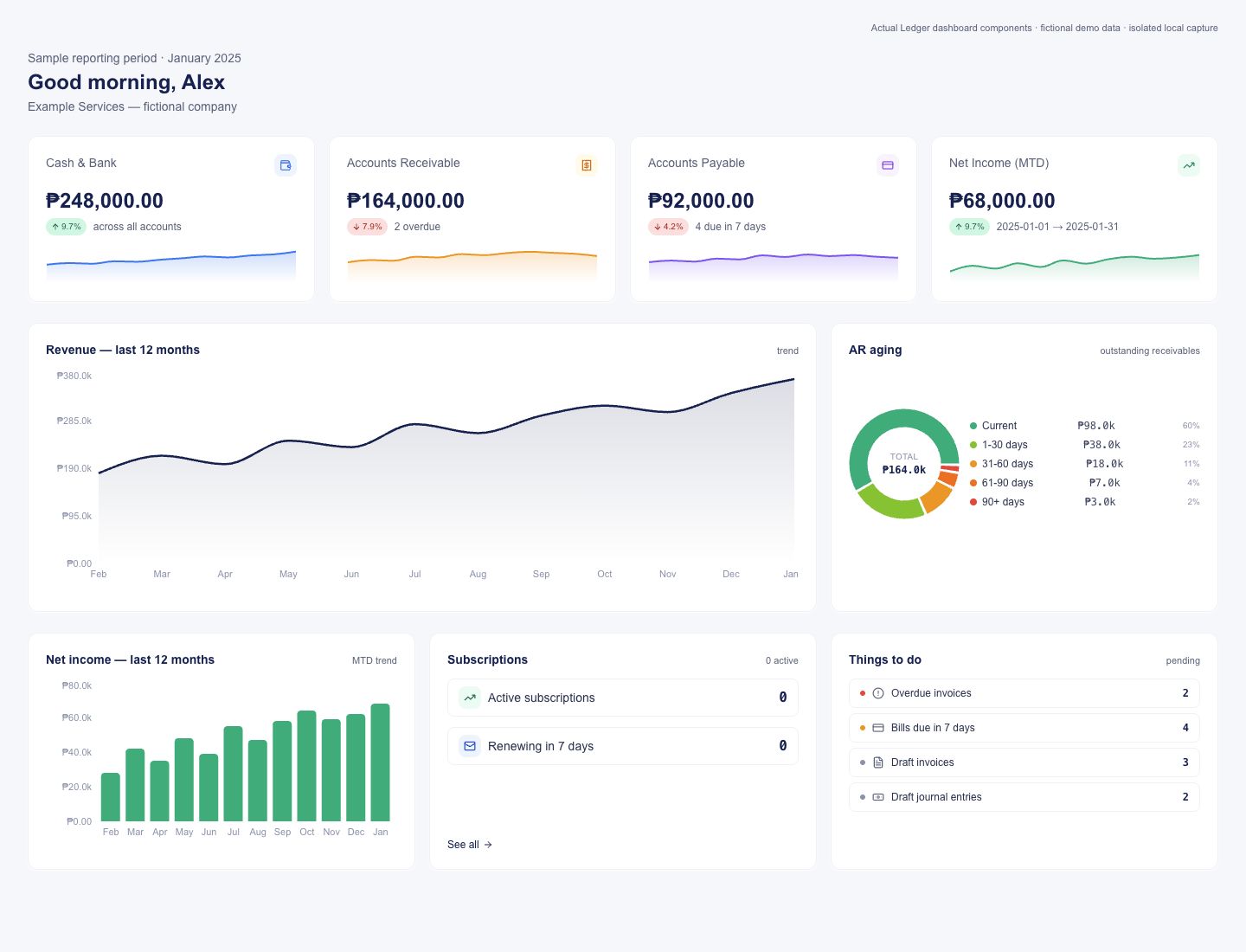
Actual Ledger dashboard components · fictional demo data
Original application branding retained.
A WORKFLOW WITH CONTEXT
Trace transactions, follow up on balances and review reports by company.
Organize invoices, bills and transaction entries by account and company or legal entity.
Income & expenses / Receivables / PayablesWork with journals and the general ledger, supported by period controls and audit history.
Journals / General ledger / Period controlsReview the trial balance, income statement and balance sheet for the entity you need to understand.
Financial reports / Entity reportingPUT IT IN PRACTICE
Record a supplier bill under the appropriate entity and account.
Check the journal and payable through your accounting review process.
Review the trial balance and financial statements for the selected entity and period.
Your accountant determines the accounting treatment and review process. Ledger supports recordkeeping and reporting; it does not replace professional judgment.
WHO IT’S FOR
For accountants, finance teams, CFOs and owners managing the books.
Accountants & finance teams
Review receivables, overdue invoices and supplier balances when deciding which collection or payment questions need attention.
Explore accounting workflowsAccountants & CFOs
Review journals and the checks required before closing a period, with an accounting trail available for follow-up.
See period-close controlsFinance teams & owners
Review the trial balance, income statement and balance sheet for the selected entity and period with your accountant.
Bring your reporting questionsA CLOSER LOOK AT THE WORK
Explore the screens with fictional names, figures and reporting periods.
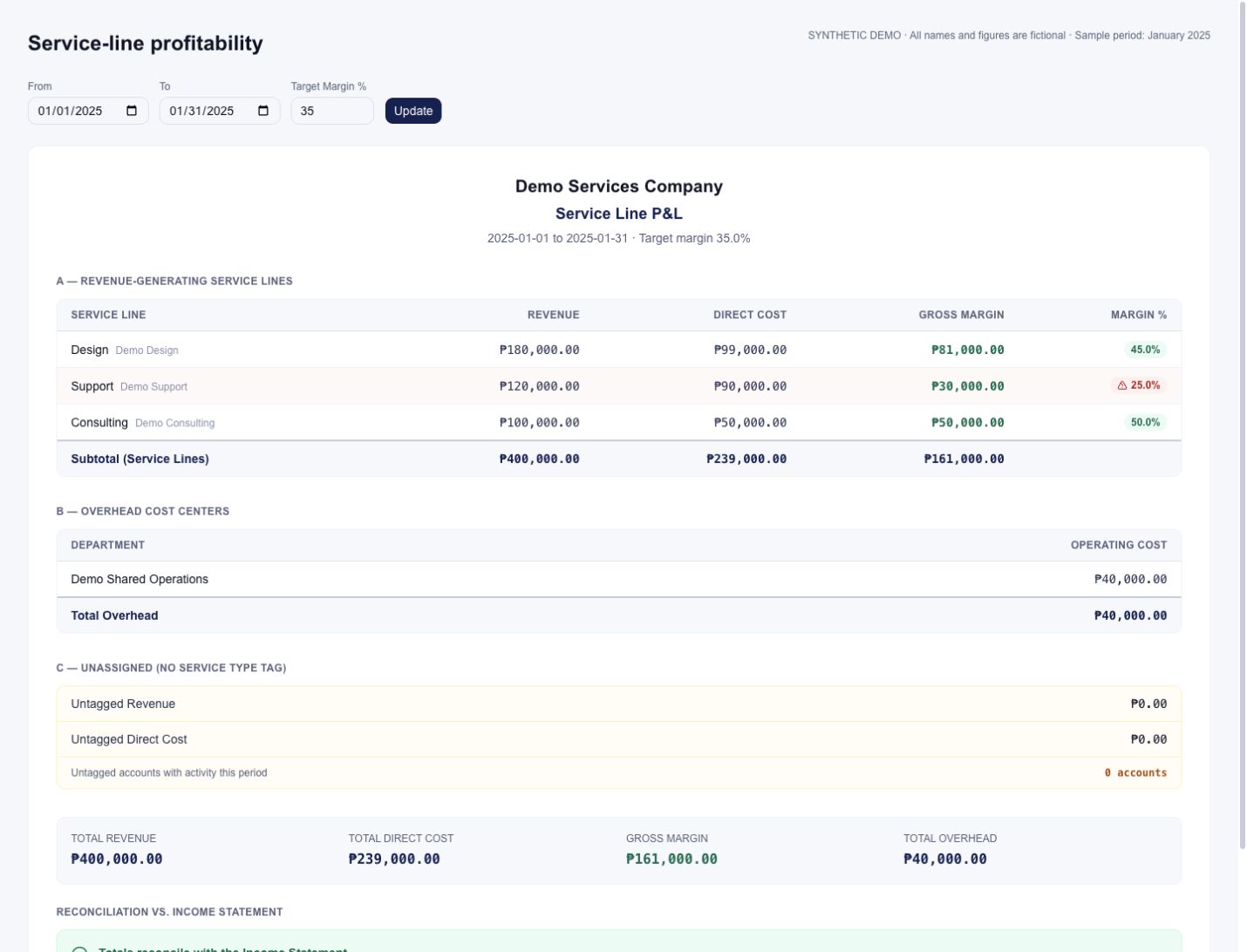
01 / SERVICE-LINE PROFITABILITY
Compare revenue, direct costs and gross margin across tagged service lines, with a target to guide the conversation.
02 / FINANCIAL DASHBOARD
Review cash, receivables, payables and financial trends from the Ledger dashboard.
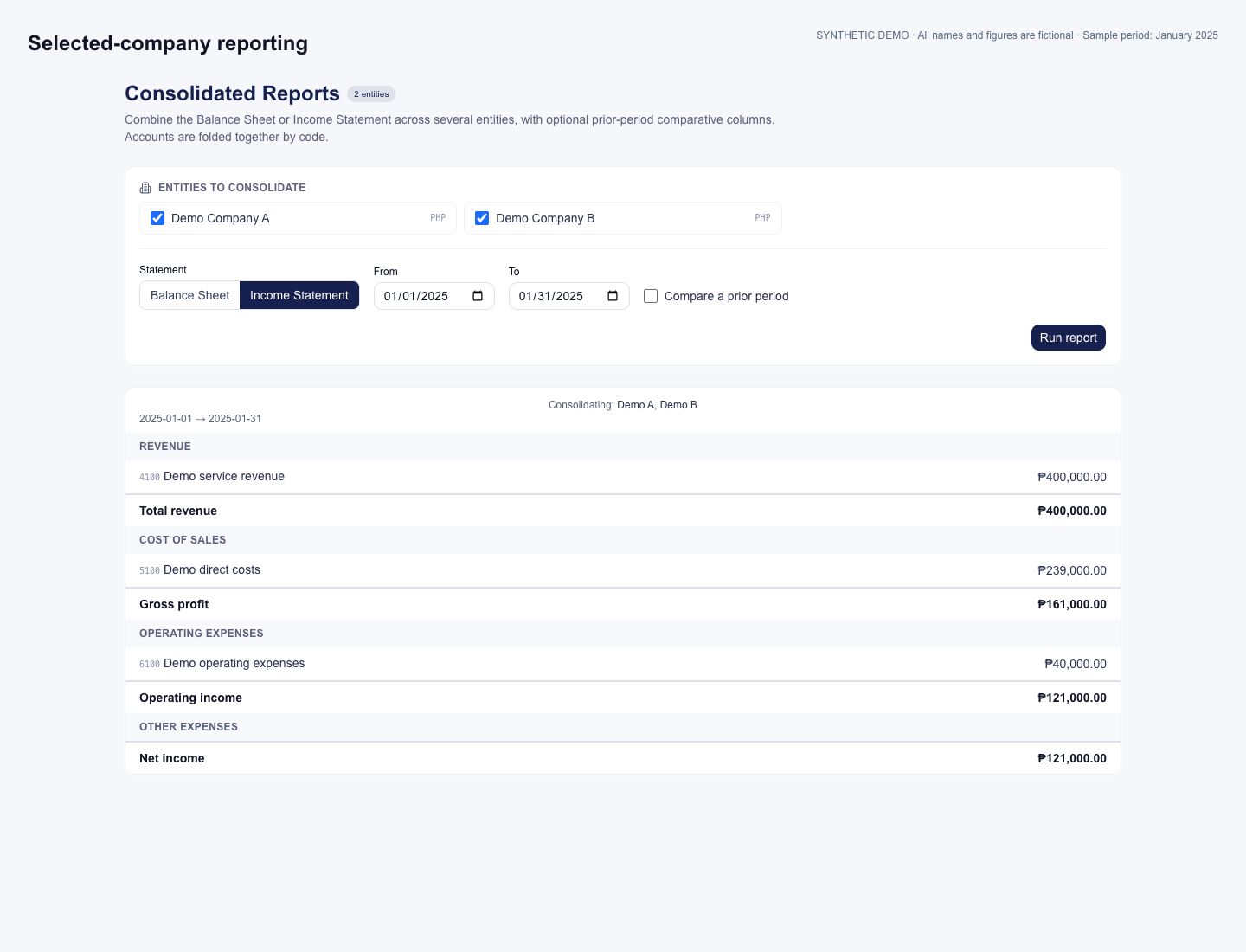
03 / MULTI-COMPANY REPORTING
Select permitted companies and review a combined financial statement using aligned account codes.
LOOK BEYOND THE FEATURE LIST
Bring a business example to explore these workflows in a demo.
Review revenue, direct costs and gross margin for tagged service lines, with a target-margin comparison. Keep unassigned amounts and overhead visible for accounting review.
Requires appropriate account tagging. Shared overhead is not automatically allocated into each service line’s net profit.
Bring two service lines and ask to trace their tagged accounts into the margin report.
Request a demo ↗Run checks before closing a month. Unposted journal entries block closing; warnings require review and explicit acceptance. The close records a snapshot of the checks.
Ask to see a draft journal prevent closing, and how the team resolves it.
Request a demo ↗Combine balance-sheet and income-statement amounts across permitted entities using matching account codes, while keeping each company’s books separate.
Use aligned account codes and the same functional currency. Combined statements do not perform currency translation or automatic intercompany eliminations.
Bring your company structure and chart of accounts to assess the group reporting fit.
Request a demo ↗AI IN SELECTED PACKAGES / HUMAN JUDGMENT
Explore read-only financial questions and human-reviewed receipt extraction in selected packages.
Use the read-only AI CFO to ask about balance sheets, income statements and available financial context.
For your teamStart a financial review with a plain-language explanation, then verify it against the reports.
Ask about receivables/payables aging and overdue invoices or bills using the available read-only tools.
For your teamIdentify records to investigate when planning collection or payment follow-up.
Extract receipt details from supported uploads, review the suggested fields and confirm them before posting.
For your teamReduce retyping of receipt details while keeping a human confirmation step in the accounting workflow.
“Which customer invoices are overdue in the selected entity?”
Illustrative prompt, not a sample result or performance promise.AI CFO tools read financial information; they do not post or edit the books. Receipt extraction requires human review and confirmation. Check figures and source documents; AI does not replace accounting or tax judgment.
AI availability depends on your selected package and configuration. Confirm included capabilities, access, usage limits, data handling and pricing during a demo.
Explore AI-enabled packages in a demoA PRACTICAL NEXT STEP
A useful demo starts with the way your business actually works.
Tell us where records, approvals or reporting take more effort than they should.
Review the product, roles and details that matter to your team.
Explore HRIS or Ledger in a free demo, or request a WorqMate demo. Confirm pricing, scope and implementation arrangements for your team.
BEFORE WE TALK
The questions worth asking before you choose business software.
FilWorx Ledger is accounting and bookkeeping software for recording transactions, managing receivables and payables, maintaining journals and reviewing financial reports.
The application organizes accounting activity by legal entity and includes entity-level reporting. Confirm your required entities and reporting boundaries during evaluation.
Your accounting team remains responsible for accounting decisions, reconciliations and review. Ledger supports recordkeeping and reporting; it does not replace professional judgment.
This website does not offer tax filing, banking connections or BIR accreditation as part of the product scope. Discuss any such requirements explicitly during evaluation.
Yes. Use FilWorx Ledger independently or together with FilWorx HRIS, with synchronization available for your setup. Ask us to demonstrate the synchronized workflow during a demo.
AI CFO tools are read-only: they can retrieve financial reports, aging and overdue-document context to support questions. Receipt extraction is a separate workflow with human confirmation before posting. AI output requires accounting review; availability and usage terms are confirmed for your setup.
FilWorx Ledger is currently available for free demos. Request a demo to explore your transaction workflow and discuss reporting needs, pricing and the available setup.
LET’S LOOK AT YOUR WORKFLOW

Tell us what you need to manage, what takes too much time, and what you want to see more clearly.
Use HRIS or Ledger independently, or use both together. Ask us to demonstrate the synchronization available for your setup. Ask about WorqMate separately. Customization requests are welcome; tell us about your requirements.
HRIS and Ledger are currently available for free demos.
Request a demo to discuss pricing and the available setup.
Start with a conversation.
Choose with confidence.