
Find the employee context.
Bring employee details and assigned schedules into reach when HR is checking a record or answering a question.
Employee records / Shift schedules
FILWORX HRIS / ATTENDANCE, LEAVE & PAYROLL WORKFLOWS
For HR and payroll teams, supervisors and business owners. Manage employee records, attendance and leave, then review exceptions and payroll inputs before processing.
HR Copilot for questions, policy context and drafts—available in selected packages.
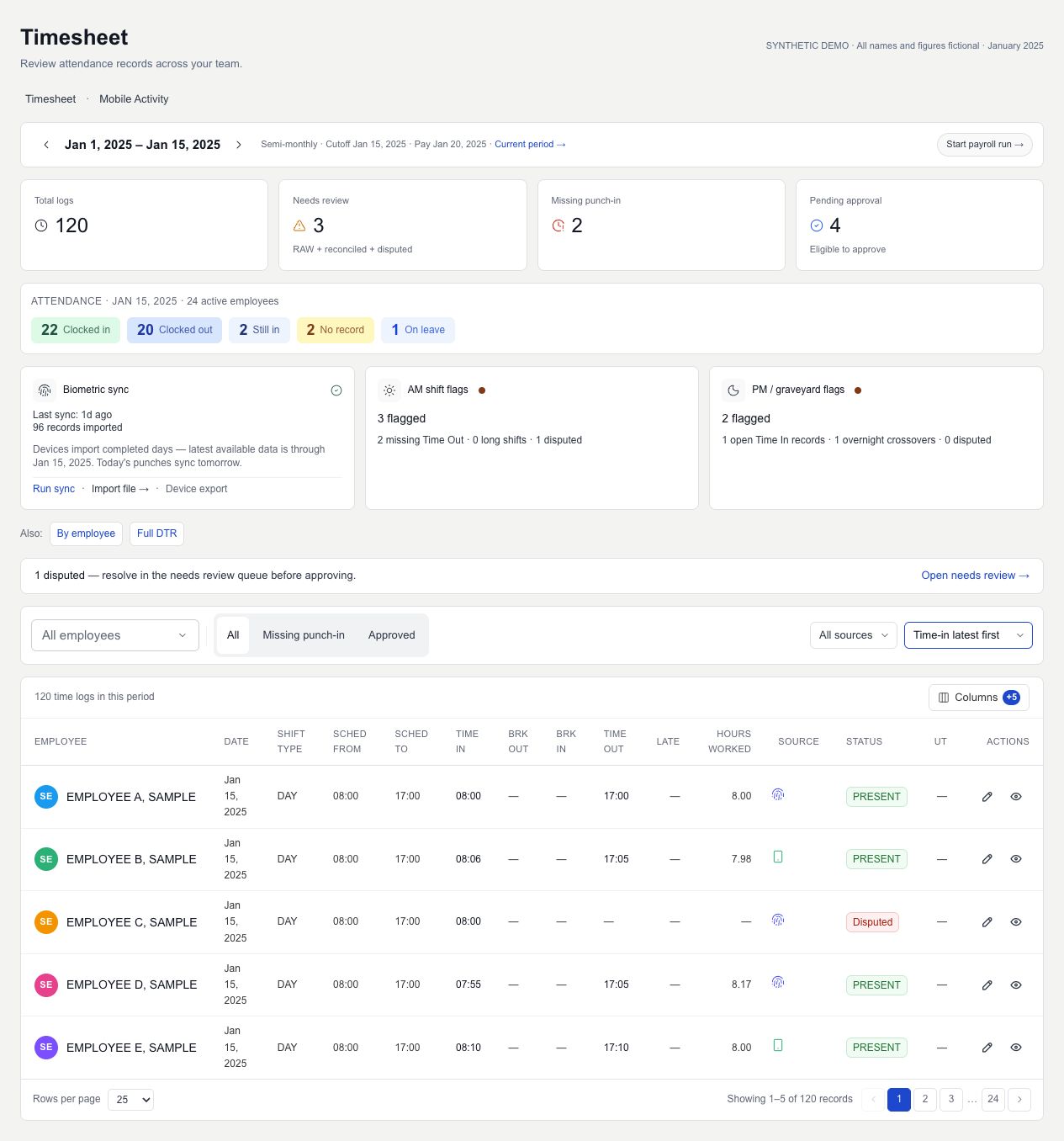
Actual timesheet dashboard component · fictional employees, records and January 2025 sample dates
Original application branding retained.
A WORKFLOW WITH CONTEXT
Review employee records, schedules and attendance before preparing payroll.
Bring employee details and assigned schedules into reach when HR is checking a record or answering a question.
Employee records / Shift schedulesReview missing punches, lateness, absences and leave alongside the relevant schedule before deciding what needs correction.
Timekeeping / Attendance review / LeaveCheck payroll readiness and review attendance inputs before running payroll computation.
Payroll preparation / Computation / ReportsPUT IT IN PRACTICE
Time records sit alongside employee schedules and leave.
HR examines lateness, absences and missing punches before moving ahead.
Review payroll readiness and inputs before payroll computation.
Payroll preparation and computation are distinct from statutory filing and bank disbursement. Confirm your required scope during evaluation.
WHO IT’S FOR
For HR and payroll teams, supervisors and owners preparing for the next cutoff.
HR teams & owners
Review employee details and assigned schedules when checking a record or answering a team member’s question.
Explore employee workflowsSupervisors & HR teams
Review missing punches, absences and leave alongside schedules so the next conversation starts with the relevant record.
See attendance reviewPayroll teams
Review payroll readiness and attendance inputs before payroll computation, keeping unresolved details visible for follow-up.
Discuss your cutoffA CLOSER LOOK AT THE WORK
Explore the screens with fictional names, figures and reporting periods.
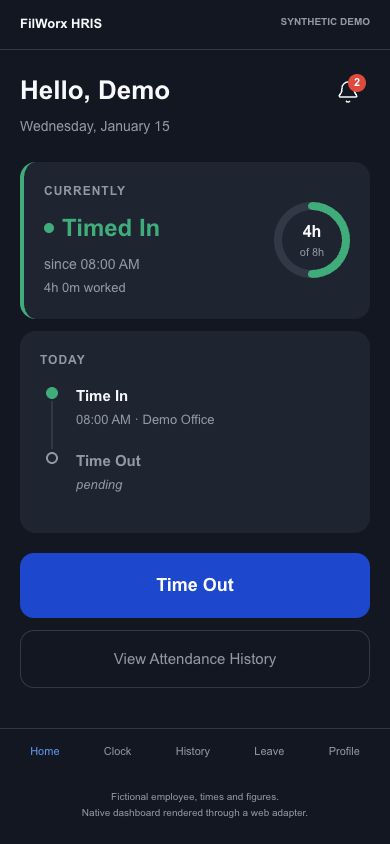
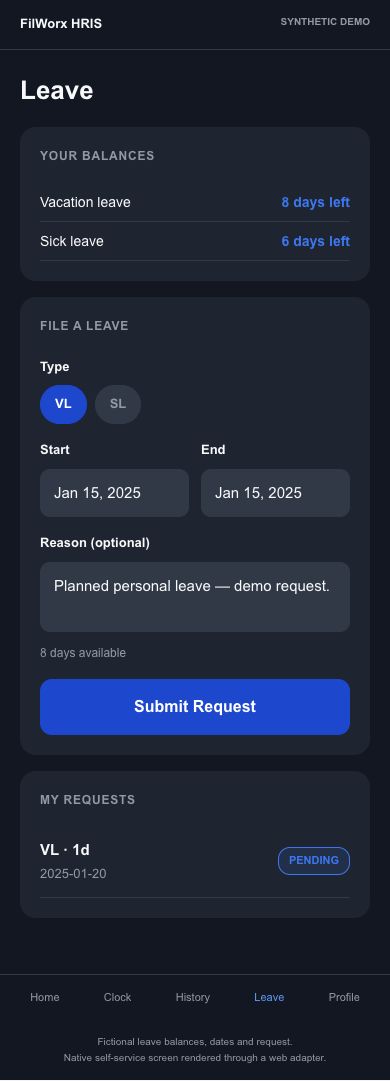
01 / MOBILE DASHBOARD & SELF-SERVICE
Track attendance, check leave balances and submit leave requests in the employee mobile app.
Attendance dashboard
Employee self-service
02 / TIMESHEET DASHBOARD
Review team attendance, biometric sync status and shift flags alongside employee time records.
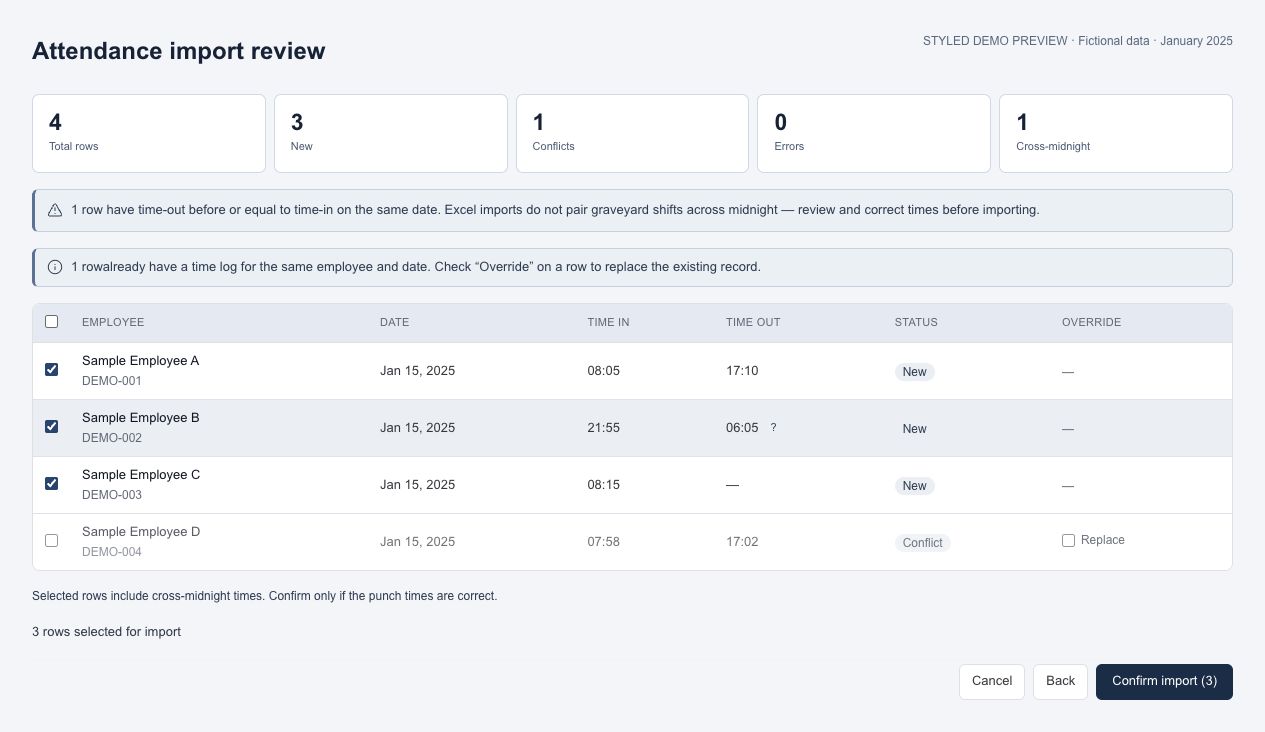
03 / ATTENDANCE REVIEW
Review imported time records before confirming them. Keep conflicts, missing punches and cross-midnight cases visible for correction.
LOOK BEYOND THE FEATURE LIST
Bring a business example to explore these workflows in a demo.
Review missing punch-outs, overnight punch-pair candidates, disputed records and same-day duplicates from different timekeeping sources. Current, previous and older pay-period groups help HR see what needs attention first.
Ask to see an overnight shift and a duplicate mobile/biometric record move through review.
Request a demo ↗Approved time changes, undertime adjustments and work/rest-day swaps carry payroll-impact notes. Changes that need attention can be flagged for payroll review, with approval details retained.
Bring a day-swap example and review the approval and payroll follow-up together.
Request a demo ↗Identify employees without an active pay profile, with missing required ID records, or with a placeholder employee number. Give HR a focused list of employee-data gaps to resolve.
Checks identify missing records; they do not verify ID validity or certify compliance.
Ask to see how missing employee details are identified before a payroll run.
Request a demo ↗AI IN SELECTED PACKAGES / HUMAN JUDGMENT
Ask HR Copilot about supplied records and available policies. Selected packages only; your team makes the decisions.
Ask questions using the attendance patterns, leave and workforce context supplied to the Copilot.
For your teamBring relevant context together before following up with your HR team.
Ask policy questions using the available company handbook PDFs attached to the conversation.
For your teamFind a starting point for checking what your own documents say. Verify the cited passage before acting.
Request a draft HR response or notice using the information you provide.
For your teamGive HR a first draft to review and adapt, while retaining responsibility for wording, facts and decisions.
“Summarize the attendance patterns in the available records.”
Illustrative prompt, not a sample result or performance promise.Responses depend on the supplied records and documents and can be incomplete or incorrect. HR, payroll and employment decisions require human review; AI output is not a compliance guarantee.
AI availability depends on your selected package and configuration. Confirm included capabilities, access, usage limits, data handling and pricing during a demo.
Explore AI-enabled packages in a demoA PRACTICAL NEXT STEP
A useful demo starts with the way your business actually works.
Tell us where records, approvals or reporting take more effort than they should.
Review the product, roles and details that matter to your team.
Explore HRIS or Ledger in a free demo, or request a WorqMate demo. Confirm pricing, scope and implementation arrangements for your team.
BEFORE WE TALK
The questions worth asking before you choose business software.
FilWorx HRIS is a human resource information system (HRIS) for managing employee records, shifts, attendance, leave and payroll preparation.
The application includes payroll computation workflows. A demo should confirm how your pay rules, attendance policies and review process fit. Payroll preparation and computation do not by themselves mean statutory filing or bank disbursement.
The application includes employee access and role-based management workflows. Confirm the permissions and approval setup your organization needs during evaluation.
Shift schedules and attendance review are part of the application. Bring examples of rotating shifts, overnight work or multiple teams to a demo so you can assess your specific policies.
Yes. Use FilWorx HRIS independently or together with FilWorx Ledger, with synchronization available for your setup. Ask us to demonstrate the synchronized workflow during a demo.
Depending on your package and configuration, the HR Copilot can respond using supplied HR context and available company handbook PDFs, and help draft HR communications. Responses require review against records and policies. It does not replace HR judgment or guarantee payroll or employment-law compliance. Confirm configuration and usage terms during a demo.
FilWorx HRIS is currently available for free demos. Request a demo to explore your HR workflows and discuss pricing, setup, implementation and support arrangements.
LET’S LOOK AT YOUR WORKFLOW

Tell us what you need to manage, what takes too much time, and what you want to see more clearly.
Use HRIS or Ledger independently, or use both together. Ask us to demonstrate the synchronization available for your setup. Ask about WorqMate separately. Customization requests are welcome; tell us about your requirements.
HRIS and Ledger are currently available for free demos.
Request a demo to discuss pricing and the available setup.
Start with a conversation.
Choose with confidence.